
The Panic of a Stolen Digital Identity
Imagine waking up to a notification that claims your website—the one you've spent years building—is being transferred to a stranger. It is a quiet, devastating moment when you realize your digital home is under siege. You haven't sold it, and you haven't moved it, yet someone else is holding the keys. If you think you're too small a target for hackers, think again. Let's talk about how to stop this nightmare before it starts.
My stomach dropped instantly. I hadn't initiated any transfer, nor had I sold my website. I felt a wave of intense fear wash over me because I knew exactly what this meant. Someone, somewhere, was trying to snatch away years of hard work, blog posts, and organic traffic.
The panic was real. My hands were shaking as I tried to log into my registrar account, worried that my password had already been changed. I felt incredibly small and helpless, staring at a screen that represented months of late nights and dedication.
It is a terrifying feeling to realize that your digital front door is being unlocked by a stranger. You work so hard to grow your brand, only to realize how fragile that ownership can be if you are not careful. I spent the next hour in a state of high alert, contacting support and changing every single security setting I could find.
When your domain is compromised, your whole world feels like it is falling apart. You lose control of your email, your website content, and even your reputation. The stress of trying to reclaim what is yours is something no website owner should ever have to experience.
Quick Threat Severity Guide
TL;DR: The Domain Security Checklist
-
Enable the Registrar Lock: This is your strongest barrier against unauthorized transfers.
-
Use App-Based 2FA: Avoid SMS codes; use an authenticator app for real protection.
-
Never Click Email Links: Always visit your registrar's dashboard by typing the URL yourself.
-
Separate Your Email: Use a private, secure email address solely for your domain registrar account.
Why Domain Security is Your First Line of Defense
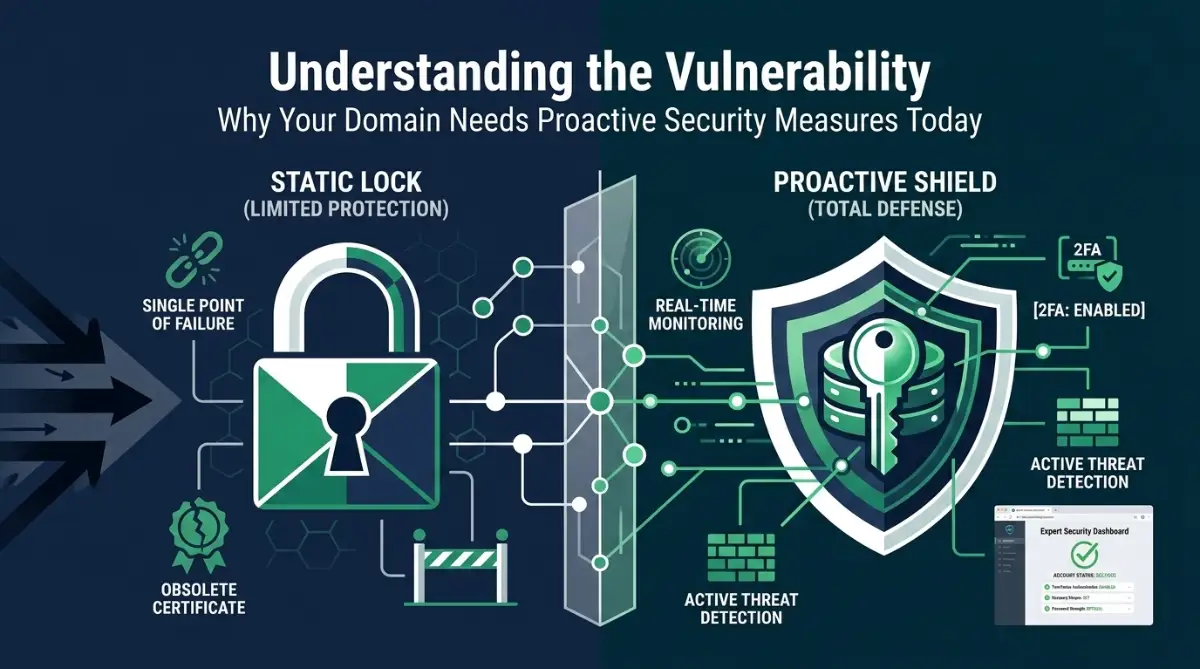
Most of us spend our time worrying about SEO, content quality, and social media reach. We obsess over keywords and backlinks, hoping to climb the search results. But we often ignore the foundation that holds everything together: the domain registration itself.
Think of your domain as the deed to your house. If someone gets their hands on that deed, they can legally claim they own the building, change the locks, and kick you out. That is essentially what happens during an unauthorized domain transfer.
When a hacker gains access to your registrar account, they don't just steal a name; they steal your traffic, your brand, and your audience. The psychological toll is massive, and the process of recovering a stolen domain is often slow, painful, and sometimes impossible.
Many people assume that because they have a strong password, they are safe. That is a dangerous myth. Sophisticated attackers use email phishing, account breaches, and even social engineering to bypass simple security measures.
The goal of this post is not to scare you, but to empower you. You have the power to put up barriers that make you a very difficult target for these bad actors. By taking a few simple steps today, you can gain peace of mind and focus on what really matters—growing your content.
Implementing a Rock-Solid Domain Security Strategy
Securing your domain is not about being a tech genius; it is about being consistent and smart. You need to treat your domain registrar account with the same level of protection as your bank account. Here are the practical steps you can take right now to lock down your assets.
The Power of the Domain Registrar Lock
The most basic yet effective tool in your arsenal is the "Registrar Lock" or "Transfer Lock." Many registrars enable this by default, but you should never assume it is on. When this lock is active, the domain cannot be moved to another registrar, even if someone has your authorization code.
Log into your registrar's dashboard and look for your domain settings. Search specifically for "Transfer Lock" or "Registrar Lock" and make sure it is turned on. It acts as a permanent barrier against unauthorized movement.
If you ever need to transfer your domain legitimately, you can simply turn it off for a few hours. After the transfer is complete, turn it right back on. It is a simple flick of a switch that provides a massive layer of security.
Strengthening Your Account Access
The biggest vulnerability for most domain owners is the email address linked to the registrar account. If a hacker gets into your email, they can request password resets for your domain account. They can then bypass every other security measure you have in place.
You must ensure that your email account has two-factor authentication (2FA) enabled. It is non-negotiable. Even if someone guesses your password, they will be blocked by the second layer of security on your phone or authenticator app.
Beyond your email, make sure your domain registrar account also uses 2FA. Do not rely on SMS-based 2FA if you can help it, as SIM swapping is a real risk. Use an authenticator app that generates codes locally on your device.
Pro Tip: I learned this the hard way after a close call with my own account. I used to use the same password for everything because it was convenient. I realized that if one site got hacked, my entire digital life was at risk. I switched to a dedicated password manager and a unique, complex password for my registrar account, and it was the best security decision I ever made.
How to Keep Your Domain Authorization Code Safe
Your Authorization Code, also called an EPP code, is like a key to your domain. It allows you to transfer your domain to another registrar, so keeping it private is essential. Never share this code unless you are completing a legitimate, verified domain transfer.
Storing your code in a plain-text file on your desktop is risky. If your computer becomes infected with malware, someone could access the file and misuse the code to attempt an unauthorized domain transfer.
Instead, store your EPP code in a trusted, encrypted password manager. If you have no plans to transfer your domain, there is generally no need to request the code. Keep it secure and retrieve it only when necessary. For additional protection, enable two-factor authentication on your registrar account and keep your account login credentials private.
Enabling Domain Privacy Services
Many domain extensions require your contact information to be published in a public directory called WHOIS. This directory is public, and hackers use it to harvest contact information for phishing attacks. They might send you fake renewal notices that look official but are designed to steal your login credentials.
Enabling "Domain Privacy" or "WHOIS Privacy" masks your personal information. It replaces your name, email, and phone number with the registrar's contact details. This effectively hides you from automated scrapers and malicious actors.
It is a small service that usually costs very little, and some registrars offer it for free. Check your account settings today to ensure your personal details are not being broadcast to the entire internet.
Securing your digital footprint can feel overwhelming, but seeing the settings in action makes a world of difference. Watch this brief guide to understand exactly where to click to enable these critical safety features on your own domain dashboard.
Monitoring and Alert Systems
Prevention is great, but awareness is just as important. Most reputable registrars provide notification services for any account activity. Make sure these alerts are turned on.
You want to receive an email immediately if someone logs into your account from a new location. You also want an alert if any settings are changed or if a transfer request is even initiated. Having this early warning system allows you to act before the damage is done.
Check your notification preferences in your dashboard. Ensure that the email address associated with these alerts is one you check every single day. If you use a secondary email for your business, make sure that inbox is actively monitored.
The Myth of "Too Small to Hack"
They are not looking for you specifically; they are looking for "weak" sites. If your site has an easy-to-guess password or lacks a lock, you are an easy mark. They want your site to host malicious content, send spam, or redirect traffic to their own pages.
Your size does not protect you. In fact, smaller sites are often easier to hijack because the owners are less likely to have sophisticated security measures in place. Being proactive is the best way to ensure your hard work stays yours.
Establishing a Regular Security Audit
Security is not a "set it and forget it" task. You should perform a quick security audit of your accounts once every few months. This does not need to take long.
Log into your registrar, check your 2FA settings, ensure your recovery phone numbers are up to date, and review your contact information. Make sure no unauthorized secondary users have been added to your account.
Think of it like checking the locks on your doors before going to bed. It only takes a few minutes, but it provides a huge boost to your overall safety. Staying consistent with these audits keeps your defenses strong.
What to Do If You Suspect a Breach
If you ever see an alert about an unauthorized login or a transfer request you did not make, you must act instantly. Do not wait for someone else to fix it.
First, change your password immediately. If you have been locked out of your account, contact your registrar's support team right away. Use their official website to find their emergency support number or chat channel.
Do not click on links in suspicious emails that claim your domain is being transferred. Go directly to your registrar’s official website by typing the URL yourself. Phishing emails are designed to look like the real thing, and clicking a link could give them exactly what they need.
Understanding the Role of Registrars
Remember that your registrar is your partner in this. They have a vested interest in keeping your domain safe because a hacked domain is bad for their business reputation, too. Most registrars have dedicated security teams that can help you if things go wrong.
When you choose a domain registrar, look for those that emphasize security. Read their support documentation to see how they handle account recovery. A good registrar will have clear, easy-to-follow guides on enabling 2FA and other security features.
If your current provider makes it impossible to find security settings or offers no 2FA, it might be time to consider moving your domain to a more secure provider. Your choice of registrar is the foundation of your domain's safety.
Building a Culture of Vigilance
Ultimately, the best defense is a vigilant mindset. Be skeptical of unsolicited emails. Be careful about who you share your account access with. Do not reuse passwords across different platforms.
If you have a team helping you with your website, manage their access properly. Give them the minimum level of access they need to do their jobs. Never share your primary account credentials with anyone.
When you treat your domain as a valuable asset—which it truly is—you naturally become more careful. This mindset shift is what separates the people who lose their websites from those who keep them secure for years.
Closing Thoughts on Long-Term Security
The digital space is constantly changing, and threats evolve. However, the fundamental principles of domain security remain consistent. By locking your registrar account, securing your email, and staying alert, you eliminate the vast majority of risks.
Do not let fear stop you from building your online presence. Instead, let it motivate you to build a secure foundation. Once you have these measures in place, you will find that you can focus much more clearly on your content, your readers, and your goals.
You have worked hard to create something unique. Take the time today to ensure it is protected. A few simple steps, taken right now, will save you from potential heartbreak later. Your domain is your home on the web—make sure you keep the keys safe.
Now that you have the basic locks in place, it is time to move beyond the surface level. Security is not just a one-time setup; it is a way of living online. To keep your digital assets safe, you need to think like the people trying to steal them.
Thinking Like a Security Expert
Most people think their domain is just a URL. I want you to start thinking about it as a gateway to your entire digital identity. If someone gets your domain, they can redirect your email, steal your customer data, and ruin your reputation in minutes.
The first secret to advanced protection is limiting your exposure. You likely have a dozen different apps or plugins connected to your website. Many of these request permissions to manage your DNS or domain settings.
Stop and ask yourself: does that plugin really need access to my domain? Probably not. You should regularly audit the third-party services that have API access to your registrar account. Think of this just like checking your phone permissions—you might be surprised by what you find. If you want to understand how dangerous loose permissions can be, take a look at my guide on why you should stop granting unnecessary permissions to newly installed android apps as it applies to your entire digital life, not just your phone.
Setting Up a Dedicated Security Email
Many website owners use their main personal email for everything. This is a massive mistake. If your main email account gets compromised via a social media breach, your domain is now vulnerable too.
I recommend creating a dedicated, highly secure email address that is used only for your domain registrar and hosting accounts. This email should not be public. It should not be listed on your "Contact Us" page or your social media profiles.
By keeping this email address secret, you prevent attackers from even knowing which email to target. If they don’t know the email, they can’t guess the password. Use a long, complex password that is unique and stored in an encrypted vault.
Leveraging Domain Registry Notifications
Did you know most registrars have advanced notification settings that are turned off by default? You need to dig deep into your account preferences. Look for "API usage alerts," "Login notifications," and "Modification warnings."
You want to be notified the second anything changes. If you get an email saying your nameservers were updated at 3:00 AM, you will know immediately that something is wrong. This is your early warning system.
When you receive a security alert, your instinct might be to panic. Please, take a deep breath. Use that time to stay calm and invest wisely during market volatility mentality—the same logic applies to handling a potential security breach. Panicking leads to bad decisions, while staying calm helps you follow the right recovery steps.
Understanding the Chain of Ownership
Your domain ownership is verified through a chain of contact information. Attackers often try to initiate a "domain hijack" by changing the ad